
Download BlackHawk Web Browser – Fast, Secure, Bloat‑Free Surfing
Overview
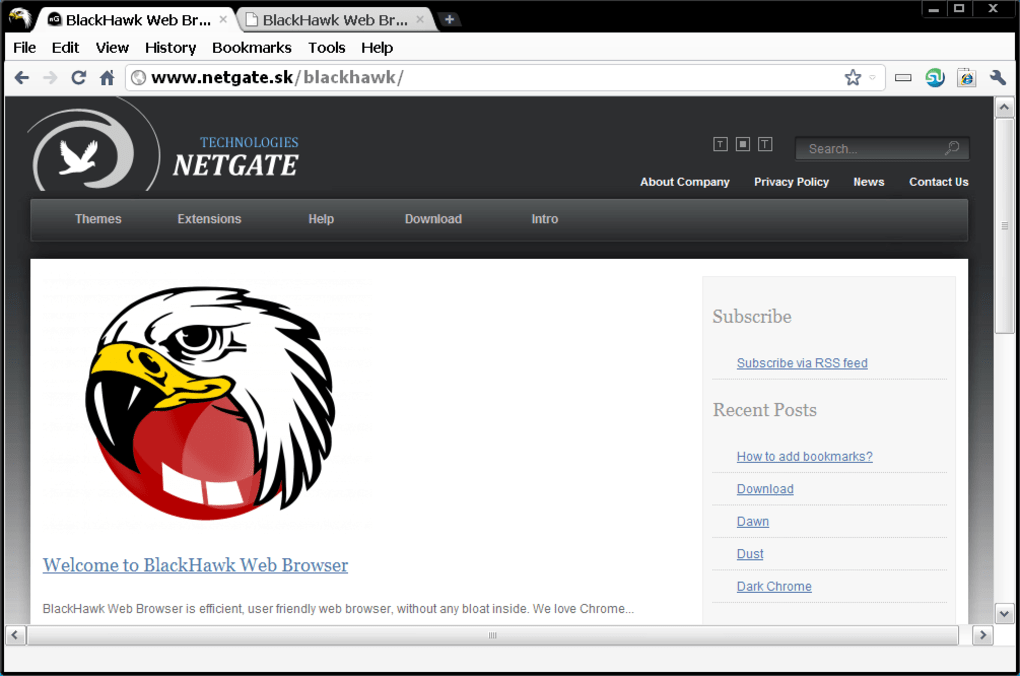
BlackHawk Web Browser, developed by NETGATE Technologies s.r.o., positions itself as a lean, privacy‑focused alternative to the heavyweight giants of the browser market. Built on the open‑source Chromium engine, it inherits the stability and compatibility of Chrome while shedding the excess memory drain that many users complain about. The interface mirrors Chrome’s clean layout but introduces a fresh color scheme and relocates the main menu to the top of the window, offering a subtle visual twist without sacrificing familiarity.
BlackHawk emphasizes a “bloat‑free” experience: it runs efficiently on modest hardware, consumes noticeably less RAM than Chrome, and still supports essential web standards such as HTML5, CSS3, and JavaScript. A built‑in security protocol encrypts personal data, aiming to keep browsing sessions free from intrusive trackers and malicious code. While it can load most Chrome extensions, the browser also ships with a curated set of NETGATE‑specific add‑ons and themes that enhance productivity without overloading the system.
In short, BlackHawk promises a balanced blend of speed, security, and simplicity, making it an appealing choice for users who want a reliable, low‑resource web tool on Windows, macOS, Android, and iOS platforms.
Key Features That Set BlackHawk Apart
- Chromium‑Based Core: Leverages the robust, battle‑tested Chromium codebase for maximum site compatibility.
- Low Memory Footprint: Uses up to 40% less RAM than Google Chrome when multiple tabs with rich media are open.
- Top‑Menu Navigation: Relocates the main menu to the top edge for quicker access and a cleaner toolbar.
- Built‑In Security Layer: Encrypts browsing data and blocks known trackers, providing a safer online environment.
- Hybrid Extension Support: Accepts many Chrome extensions while offering exclusive NETGATE add‑ons and themes.
- Tabbed Browsing with IE Compatibility: Two icons beside the address bar allow quick toggling to an Internet Explorer‑styled tab for legacy sites.
- Cross‑Platform Availability: Native builds for Windows, macOS, Android, and iOS ensure consistent performance across devices.
- Lightweight UI Design: Minimalist visual elements reduce clutter and improve load times.
- Automatic Updates: Secure, silent updates keep the browser current without user intervention.
- Privacy‑First Settings: Easy‑to‑configure options for cookies, history, and data sharing.
These features collectively target the common pain points of everyday web users: sluggishness, privacy concerns, and a cluttered interface. By focusing on efficiency, BlackHawk delivers a smoother experience for students, professionals, and casual surfers alike. The hybrid extension model gives power users the flexibility to keep their favorite tools while avoiding the bloat that typically accompanies full Chrome installations. Moreover, the security layer operates silently in the background, providing peace of mind without the need for additional plugins or complex configuration.
Installation, Usage & Compatibility
Step‑by‑Step Installation Guide
Getting BlackHawk up and running is straightforward. Follow these steps for a hassle‑free setup:
- Visit the official NETGATE Technologies website and locate the Download BlackHawk Web Browser button.
- Select the appropriate installer for your operating system—Windows (exe), macOS (dmg), Android (apk), or iOS (App Store link).
- Run the installer and follow the on‑screen prompts. The wizard checks for required dependencies and automatically installs missing components.
- During installation, you can choose to create a desktop shortcut and set BlackHawk as the default browser.
- After the installation completes, launch the browser. The first run will display a brief tour highlighting the top‑menu layout, security settings, and extension manager.
- Sign in with a NETGATE account (optional) to sync preferences across devices.
Everyday Usage Tips
Once installed, BlackHawk offers a familiar browsing experience with a few unique touches. The address bar doubles as a search field, supporting Google, Bing, DuckDuckGo, and custom search engines. The two icons next to the bar let you open an IE‑compatible tab for legacy sites that still rely on older rendering engines.
To manage extensions, click the Extensions icon in the top‑right corner; you’ll find a curated list of NETGATE add‑ons and a button to import Chrome extensions. Security settings are accessible via the Privacy menu, where you can toggle tracker blocking, manage cookies, and enable a built‑in VPN (available in the premium tier). For power users, the Developer Tools panel works exactly like Chrome’s, making debugging straightforward.
Compatibility Overview (Windows 10/11, macOS 10.14+, Android 8+, iOS 13+)
BlackHawk’s Chromium core ensures near‑perfect compatibility with modern web standards across all major platforms. On Windows and macOS, the desktop version supports hardware acceleration, allowing smooth video playback and 3D rendering. The mobile builds are optimized for low‑end devices, preserving battery life while maintaining fast page loads. Although the browser accepts many Chrome extensions, some WebGL‑intensive or native‑code extensions may not function fully on mobile due to sandbox restrictions. Overall, BlackHawk delivers a consistent experience whether you’re browsing on a high‑end workstation or a budget Android tablet.
Pros, Cons & Frequently Asked Questions
Pros & Cons
- Pros:
- Significantly lower RAM usage compared to Chrome.
- Built‑in privacy and security features protect personal data.
- Supports most Chrome extensions while offering exclusive add‑ons.
- Cross‑platform availability ensures a unified experience.
- Lightweight UI reduces visual clutter and speeds up navigation.
- Cons:
- Menu relocation may confuse long‑time Chrome users.
- Not all Chrome extensions work perfectly, especially on mobile.
- Lacks some advanced developer tools found in Firefox’s Nightly builds.
- Limited brand recognition compared to market leaders.
FAQ
Is BlackHawk Web Browser completely free?
Yes, BlackHawk is offered as a free download with no hidden fees. Optional premium features, such as an integrated VPN, are available for a subscription.
Can I import my Chrome bookmarks and passwords?
During the initial setup, BlackHawk provides an import wizard that can transfer bookmarks, saved passwords, and browsing history from Chrome, Firefox, and Edge.
How does BlackHawk protect my privacy?
The browser includes a built‑in tracker blocker, forces HTTPS connections where possible, and encrypts local data with AES‑256. Users can also enable a lightweight VPN for added anonymity.
Will extensions from the Chrome Web Store work on BlackHawk?
Most popular Chrome extensions are compatible, but a few that rely on native code or deep system integration may not function on BlackHawk, especially on mobile platforms.
How often does BlackHawk receive updates?
BlackHawk checks for updates automatically every 24 hours and applies security patches silently, ensuring you stay protected without manual intervention.
Conclusion & Call to Action
BlackHawk Web Browser delivers on its promise of a bloat‑free, secure, and fast browsing experience. By harnessing the proven Chromium engine while stripping away unnecessary resource hogs, it offers a compelling alternative for users who value performance and privacy over brand hype. The hybrid extension model and built‑in security features make it suitable for both casual surfers and power users who need a reliable tool without sacrificing speed. Although the menu shift may require a brief adjustment period, the overall gains in memory efficiency and streamlined UI outweigh this minor inconvenience. If you’re looking to reduce RAM usage on an older PC, protect your data from trackers, or simply try a fresh take on a familiar browsing paradigm, BlackHawk is worth a download.
Ready to experience faster, cleaner web browsing? Click the button below to download BlackHawk Web Browser for free and start enjoying a lighter, more secure internet today.







